
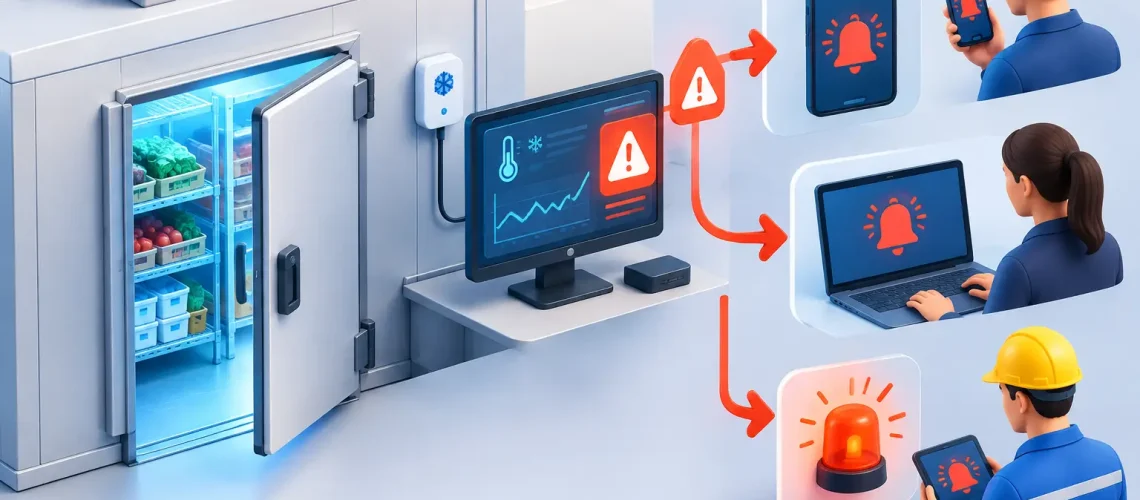

A refrigerated case can drift out of range at 2:00 a.m. long before anyone sees a puddle on the floor, hears a compressor struggle, or finds compromised product at opening. To configure refrigeration alarm escalation effectively, facilities need more than a text message when temperature rises. They need a defined response path that identifies the right condition, reaches the right person, and keeps advancing until someone owns the issue.
For grocery, food service, cold storage, medical, and biotech operations, alarm escalation is a business continuity process. The configuration should reflect the value of the inventory at risk, the system’s thermal stability, the availability of on-site staff, and the time required to correct a failure. A missed low-priority notification can become a high-cost product loss if the escalation logic is poorly designed.
Start With the Failure Scenarios That Matter
Effective alarm design begins with the conditions that create operational risk, not with a generic set of temperature limits. A walk-in cooler, a freezer rack, a vaccine refrigerator, and a refrigerated display case do not fail at the same speed or require the same response.
Review historical service calls, temperature trends, defrost activity, door-open events, compressor failures, and power interruptions. This shows where nuisance alarms are occurring and where warning signs have preceded real failures. A temperature alarm that triggers every defrost cycle will eventually be ignored. A high-temperature warning that waits too long may leave little time to protect inventory.
Separate alarms into conditions that require observation, intervention, and immediate action. For example, a brief temperature deviation may be an advisory if the system is recovering normally. A sustained deviation, loss of cooling capacity, repeated compressor trip, or freezer temperature rise may require urgent escalation. The right threshold depends on the application, product requirements, system capacity, and recovery performance.
Use delays and persistence to reduce false alarms
An alarm should not fire simply because a sensor records one abnormal reading. Refrigeration systems cycle, defrost, recover after door openings, and respond to loading changes. Configuring a time delay or persistence requirement helps distinguish a temporary event from a developing failure.
That said, delays should never be used as a blanket fix for nuisance alarms. If a repeated alarm is not meaningful, investigate sensor placement, control settings, defrost schedules, airflow, door seals, or equipment performance. Suppressing symptoms can hide a condition that deserves correction.
Build an Escalation Path With Clear Ownership
A refrigeration alarm has value only when a qualified person receives it, acknowledges it, and takes appropriate action. The escalation path should be built around who can realistically respond at each stage, especially outside normal operating hours.
A practical escalation model often uses three levels. The first notification goes to the person responsible for confirming the alarm and assessing immediate risk, such as an on-site manager, maintenance lead, or designated after-hours contact. If it is not acknowledged within a defined window, the system contacts a backup responder. If the event remains unresolved or reaches a critical threshold, the final level notifies facility leadership, a service provider, or both.
The exact timing should reflect the application. A critical freezer serving a pharmacy, laboratory, or high-value food inventory may need escalation within minutes. A medium-temperature storage area with stronger thermal mass may allow more time for verification. The key is to define these choices deliberately rather than applying one schedule to every asset.
Each escalation level should answer four questions:
- Who receives the notification?
- How long do they have to acknowledge it?
- What action are they expected to take?
- Who is notified if they do not respond or cannot correct the issue?
Avoid assigning alarms to job titles without maintaining current contact information. Staff turnover, shift changes, vacations, and contractor transitions can break an otherwise well-designed notification process. Review contacts regularly and test after-hours routing before relying on it during an emergency.
Configure Refrigeration Alarm Escalation by Severity
Not every event deserves a late-night call, but every event needs a purpose. Severity tiers prevent alert fatigue while ensuring critical equipment receives fast attention.
Advisory alarms may include minor sensor communication interruptions, short-duration deviations, or performance trends that do not yet threaten product. These can appear on a dashboard, generate an email, or be assigned for review during business hours.
Warning alarms indicate that performance is outside the expected range and should be investigated promptly. Examples include extended case temperature deviation, a recurring high head pressure condition, a door left open beyond a reasonable period, or an unusual defrost recovery pattern. Warnings may go to the maintenance team and a site manager with a defined response expectation.
Critical alarms should trigger immediate, repeated escalation. These include sustained high temperature beyond product limits, freezer failure, power loss affecting refrigeration equipment, compressor rack failure, or a monitored condition showing no recovery. Critical notifications should use more than one channel when warranted, such as mobile alert, text message, voice call, and dashboard event logging.
The goal is not to send more notifications. It is to make the critical notifications impossible to overlook and straightforward to act on.
Define acknowledgment separately from resolution
Acknowledging an alarm means someone has seen it and accepted responsibility for assessment. It does not mean the issue is fixed. This distinction is essential for managers overseeing remote sites or large portfolios.
A mature workflow records the acknowledgment time, responder, condition, actions taken, and resolution status. If a technician determines that product must be moved, a door must remain closed, or emergency service is required, those actions should be documented. This creates accountability and gives facility leaders usable data after the event.
Match Notifications to the People Who Can Act
The best notification channel depends on urgency and responder role. A dashboard alert is useful for visibility, but it may not wake an on-call technician. An email is suitable for lower-priority conditions but may not support rapid after-hours response. Text and voice notifications are typically more appropriate for critical events, provided the team has clear on-call expectations.
Do not send every alarm to every stakeholder. Broad distribution can create confusion, duplicate calls, and assumptions that someone else is handling the issue. Instead, route alerts based on responsibility. Site personnel may be best positioned to check a door, verify a display case, or move inventory. Maintenance can assess equipment status. Leadership should receive notice when the event threatens operations, product, compliance, or customer service.
For multi-site operators, standardize the alarm framework while allowing site-specific adjustments. A core set of severity definitions, notification windows, and reporting standards improves consistency. Individual sites may still require different thresholds, contact trees, and emergency procedures based on equipment type, staffing, inventory value, and operating hours.
Test the Process Before a Real Failure
Alarm escalation cannot be validated from a configuration screen alone. Test it under controlled conditions. Simulate a temperature alarm, confirm that the first contact receives it, verify escalation when no acknowledgment occurs, and check that the final recipient receives the correct details.
Testing should also confirm what the responder can see. A useful alert identifies the location, asset, alarm type, current reading, duration, severity, and recommended next step. “High temperature alarm” is not enough when a facility has dozens of cases, walk-ins, or monitored points.
Review alarm performance after real events. Look for delayed acknowledgments, repeated nuisance alerts, unclear ownership, and alarms that resolved automatically without intervention. These are opportunities to refine thresholds and workflows. Refrigeration Technologies, LLC applies this type of operational review through engineered monitoring and control strategies designed around each facility’s equipment and risk profile.
Treat Alarm Data as a Maintenance Tool
The strongest escalation programs do more than react to failures. They reveal patterns that support preventive maintenance and capital planning. A recurring high-temperature event may point to an aging compressor, restricted airflow, poor defrost performance, refrigerant issues, inadequate capacity, or a control sequence that needs adjustment.
Trend data helps distinguish one-off events from systemic problems. If alarms cluster during certain hours, weather conditions, loading periods, or defrost cycles, the underlying cause can be investigated before it becomes an outage. This is where monitoring shifts from notification to performance management.
A well-configured escalation plan gives teams time to act while there is still a choice: reset a control, dispatch service, move inventory, or correct a developing equipment problem. That time is often the difference between a manageable service call and a costly refrigeration failure.